
Code Guide 2018/10/16
Administration panel
The administration panel is built with the Laravel Backpack package, which lets us build panels based on CRUD robustly. The administration panel controllers structure is as follows:
use App\Http\Requests\ModelNameStoreCrudRequest as StoreRequest – request class containing validation rules for the creation of this model.
use App\Http\Requests\ModelNameUpdateCrudRequest as UpdateRequest – request class containing validation rules for the modification of this model. In some cases, it is the same as Store.
setup() method – with this method we configure the structure of this manager, calling the following methods of the CrudPanel object with the necessary values:
- setModel – corresponding model.
- setRoute – administration route it belongs to.
- setEntityNameStrings – names to show the user.
- setColumns – columns that will be shown in the list view.
- addFields – fields that will be shown in the creation/edition view.
- denyAccess – actions which are not allowed to be executed (for example, some models cannot be deleted or created, only modified).
- removeAction – allows hiding the saving buttons if access to the corresponding actions has been denied with denyAccess.
- addFilter – filter than can pe applied to the record list.
- enableExportButtons – show buttons to export records in different formats.
- removeButton – allows button hiding in the record list if access to the corresponding actions has been denied with denyAccess.
- enableAjaxTable – shows an Ajax-type table. This is useful when there are many records in the table (for example, downloads) to accelerate page loading time and avoid overloading the server.
- with – lets us specify relationships to load with eagerLoading, to reduce the number of requests to the database.
- addClause – lets us add a predetermined filter to records shown in the list.
store() method – instructions executed when a new record is created.
update() method – instructions executed when an existing record is modified.
edit() method – allows for overwriting the edit method in CrudController if it is necessary to execute some extra setup before showing the record edition form.
The HTML templates used by Laravel Backpack can be overwritten without the need to modify the package’s source code, copying them to the folder /resources/views/vendor/backback/crud/
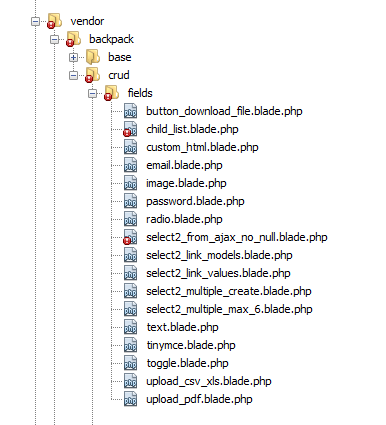
Also, in backpack/crud/fields there are customized fields:
- button_download_file: to download a file uploaded by a user via the contact form.
- Select2_from_ajax_no_null: show a selector field and don’t allow clearing even if the column is nullable in the database (used for datatable elements where category is a nullable column but required if the datatable is multiple).
- Select2_link_models and select2_link_values: used for internal link fields.
- Select2_multiple_create: show a selector field that allows direct creation of new values (used for news tags).
- Select2_multiple_max_6: show a selector that allows a max of 6 values (used for product related downloads).
- Upload_csv_xls: upload control that only allows csv and xls files.
- Upload_pdf: upload control that only allows pdf files.
The back-end CSS is located in /public/admin_assets/