
Code Guide 2018/10/16
Project file structure
The file structure is the standard for Laravel. Its content is as follows, with a basic explanation of the most important features found in each location:
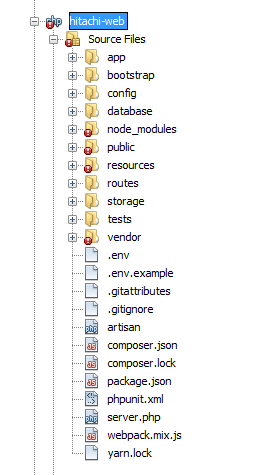
App
It contains the application’s business logic organized in the following folders:
Classes
- DatabaseLocalization: extension of the class Mcamara\LaravelLocalization\LaravelLocalization, which allows us to use the database as a source of the available/default languages to use.
- ImportDatatable: extension of the class Maatwebsite\Excel\Files\ExcelFile which allows us to load the settings for the csv_delimiter and csv_encoding from the settings table.
Console
- Kernel: scheduled tasks configuration. No tasks are scheduled at this time.
- Commands/LoadNewTextsToDB: this allows for database loading of new texts added to the file resources/defaults/texts.php
- Commands/LoadNewPagesToDB: this allows for database loading of new pages added to the file resources/defaults/pages.php
- Commands/LoadNewImagesToDB: this allows for database loading of new images added to the file resources/defaults/images.php
Exceptions/Handler
Logic to execute when there are errors during the execution of the code.
Helpers/helpers.php
Functions to be executed in the whole application without the need to instantiate a Class.
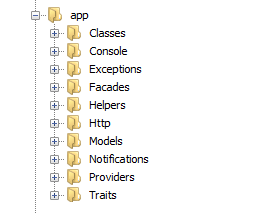
Http
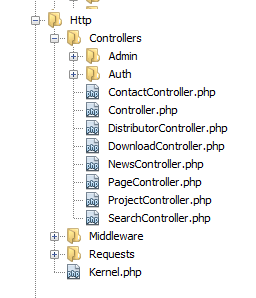
- Controllers: functions executed by the application’s https. These are the
application entry points.
- Admin: administration panel functions.
- Auth: functions related to front-end user authentication.
- Middleware: access control, encryption and security.
- Requests: validation rules for data introduced in the administration panel.
- Kernel: configuration of the middleware used in the application.
Models
In this folder we can find the Model files reflecting the structure followed by the database (Page, Range, Product, News, etc).
Notifications
Messages sent by the application (notifications to administrators, welcome emails and password resets for front-end users).
Providers
- o AppServiceProvider: common services provider for the application:
- Definition types of polymorphic relationship between the Seo Model and the "Seoable" Models.
- Customized validating tool to verify password complexity.
- Common data link to general view (view composer).
- Eloquent event capture to ensure database integrity.
- RouteServiceProvider: loads application routes from folder routes/ and assigns middlewares to different route groups.
Traits
Traits common to several models
config
Configuration of different application aspects. When a value uses the env(‘VALUE’) function, this means it can read this value from the .env file.
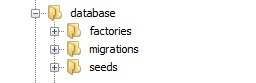
database
Configuration of different application aspects. When a value uses the env(‘VALUE’) function, this means it can read this value from the .env file.
- Factories: rules used to fill out the development database with random test data.
- Migrations: structure of data created when executing the artisan migrate php command.
- Seeds: DatabaseSeeder contains the data introduction for development environments with the artisan:db:seed php command. The rest of files are called from the migrations and introduce the "master" data that is loaded from the definitions in the folder /resources/defaults/ when installing the application.
node_modules
Packages installed with npm install according to the configuration of package.json. The code in these files must not be modified, since they are not included in the repository and they will be overwritten the next time npm install is executed.
public
This is the website’s root directory, the application’s entry point and where the compiled assets, images, sources and publicly visible files are located. It also contains a symbolic link to the folder storage/app/public.
Resources
- Assets: These assets are compiled with Laravel Mix when npm run dev (development) or npm run prod (production) is executed. The directions for Laravel Mix are in webpack.mix.js (in the project’s root).
- Defaults: data loaded to the database when first installing the application, and which can be modified from the administration panel afterwards.
- Lang: admin.php: administration panel text strings.
- Views: The .blade.php files in this folder correspond to the different
application views. These correspond to each of the pages shown on the front-end, except
for the special view js-injection.blade, which is used to inject php variables in
JavaScript, according to the setting in config/javascript.php. It also contains the
following folders:
- Admin/sidebar_menu.blade: administration panel menu.
- Auth: views related to login and to front-end password resets.
- Email/email.blade: email structure.
- Errors: views shown for each error that can be generated by the application.
- Layouts:
- app.blade: template for all pages
- maintenance.blade: template for the maintenance page
- partials: code blocks reused in different views.
- vendor: views published from external packages overwriting those in said packages
routes
- Admin: routes used in the administration panel. They require being logged in as admin.
- Api: special routes used from certain controls in the administration panel to recover data swiftly from the database. They don’t require authentication.
- Web: routes used in the front-end. They require authentication, defined in each controller.
storage
- App/public: location where files are stored (images and download files) loaded from the administration panel.
- Framework: used by the system for cache, blade compilation and session storage.
- Logs/laravel.log: log with all errors found in the system.
vendor
Packages installed with composer install according to the configuration of composer.json. The code in these files must not be modified, since they are not included in the repository and they will be overwritten the next time composer install/update is executed.